Smart home as part
of the interior design.
Without learning the systems.
You design functions like furniture, on the floor plan. The client reviews the project at home and leaves comments. You share the project with the build team and the manufacturer — and you all work on it together, without emailing files back and forth.
Smart home without an interior architect in the process — the usual story
What typically happens today between an interior architect, the client, and the smart home installer.
- 01
„Can we still add smart home?"
The question arrives at the very end — the interior is closed, colors picked, lighting drawn in, sockets already in the walls. Smart home is last on the list, something to squeeze into a finished layout.
- 02
20% of the project budget falls outside your contract
Clients spend on smart home like they spend on materials — roughly one-fifth of the total budget. They contract that pool directly with the integrator, outside your scope. You don't invoice a cent — but if the integrator wrecks the aesthetics, the reputation hit is yours.
- 03
The integrator critiques in front of the client
“I'd move that fixture”, “that wall is better for the TV” — the integrator drops it in front of the client like design corrections. The client hears uncertainty. Your authority dissolves in technical jargon you don't fully understand yourself.
- 04
The installer decides where the switch goes
The keypad lands next to the door, the PIR sensor in the ceiling corner, the junction box on a visible wall. Your composition stops working — and you find out after the install.
- 05
Changes after the build
The client only sees what they got after moving in. Every small tweak means pulling cables, breaking walls and new invoices — that nobody agreed to.
This is your workflow
From the interior floor plan to handing a finished project to the installer.
- 01Design
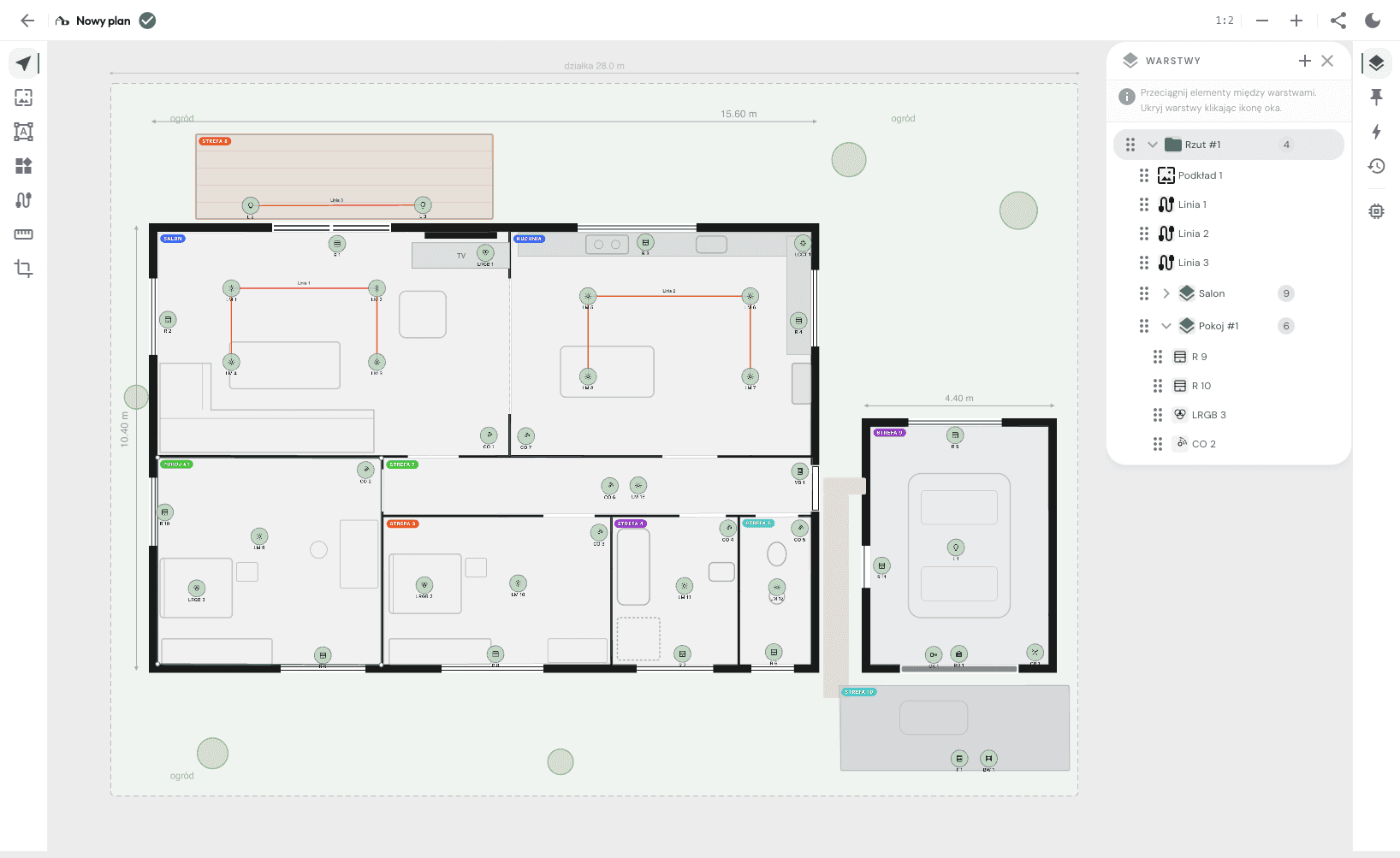
Place functions on the floor plan
Open the floor plan and place elements the way you place furniture. A lighting point above the table, a presence sensor in the hallway, a keypad by the door. You work with abstract functions — no need to know KNX or Loxone.
- 02Rules
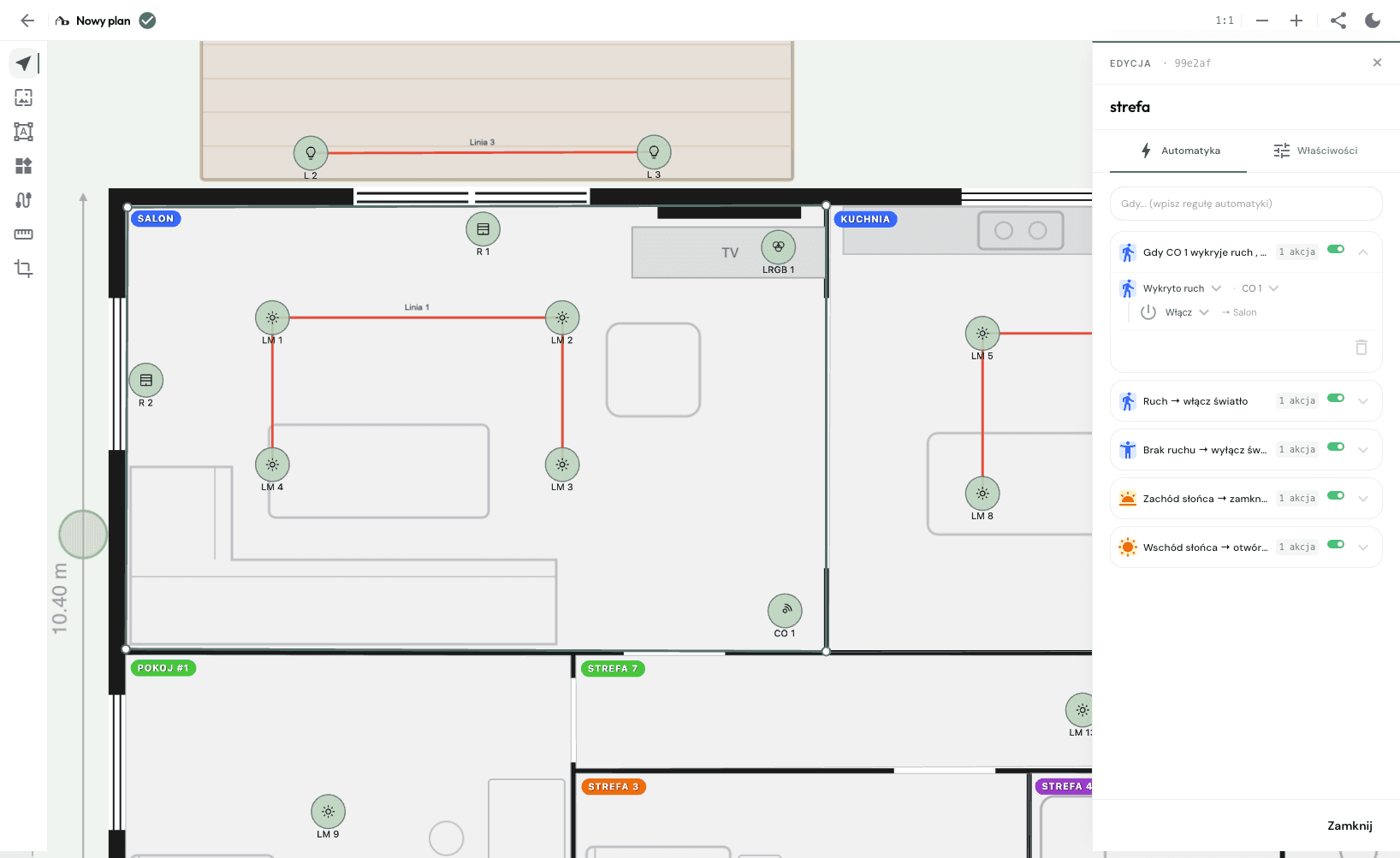
Define automations with the client
Together with the client you define scenes and rules: „leaving home turns everything off", „blinds at dusk", „motion sensor switches the hallway light at night". Every rule is written into the project — the client sees exactly what they pay for.
- 03Collaboration
Share the project with the delivery team
Invite the installer, the electrician, the manufacturer — into this one project. They open it in a browser, see the same plan, elements and automations you do. You work together live, every change visible in seconds. You keep control of the interior, they add the technical layer — no more email ping-pong.
The client reviews the project at home
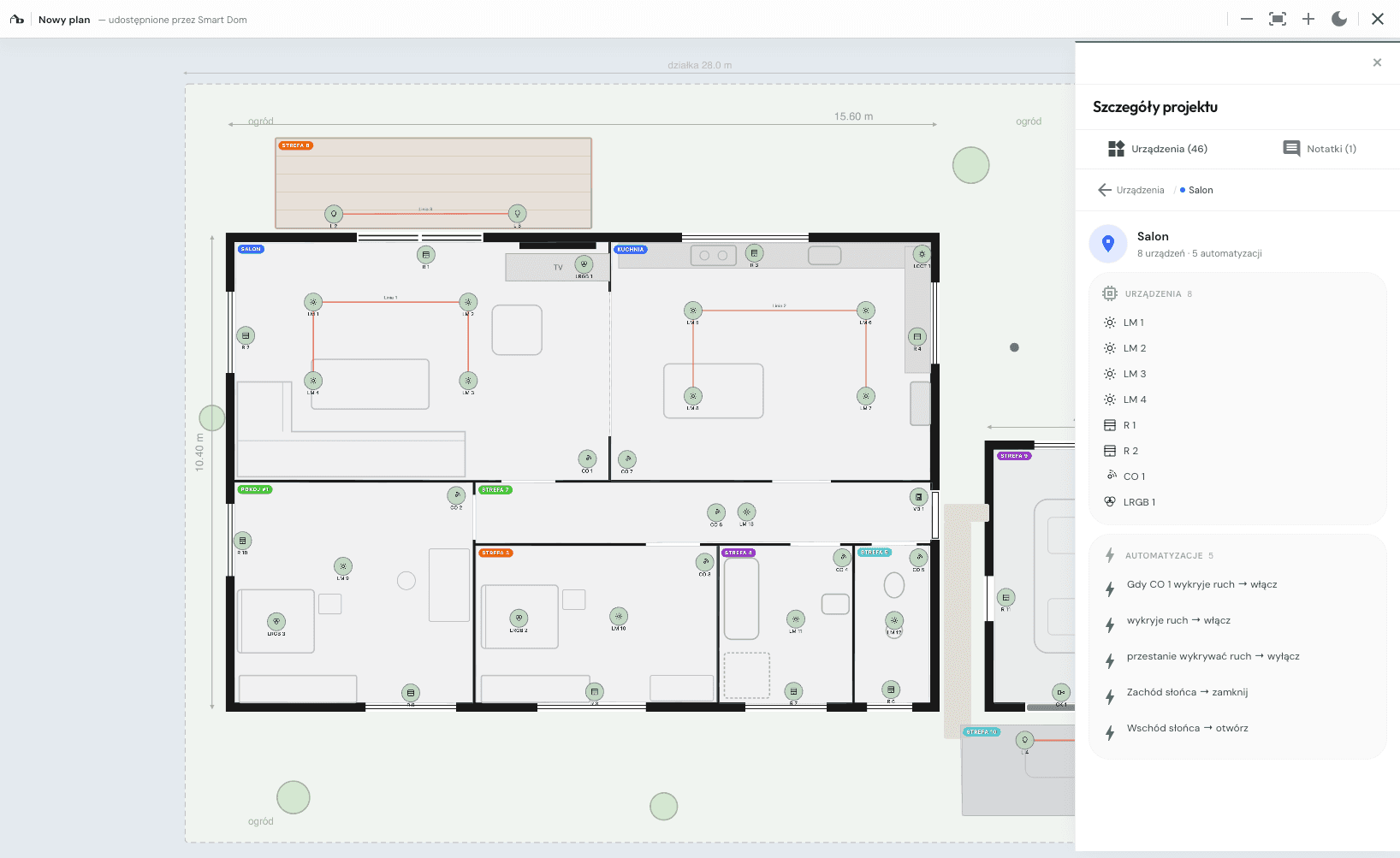
Before anything reaches the installer, the client walks through the project themselves — in a browser, without signing up.
Walks the plan like the flat
Opens the link on phone or laptop, clicks through the rooms, sees where things will be.
Leaves notes directly on the plan
Instead of emailing corrections, they pin a comment in the exact spot: „I'd rather have the switch lower", „scene looks good, leave it".
You check off what's done
You see the list of comments, adjust the project, mark them as resolved. The conversation stays in the project, not in email.
Every version saved
Did the client change their mind after two weeks? Roll back to an earlier version in one click. The scope of changes is documented.
Changes during design are free. Changes after install cost weeks and cables in the walls.
You all work on the same project together
Installer, electrician, installation company, even a lighting manufacturer — everyone sees the whole project, not an isolated inquiry by email. No more “send me the latest file”.
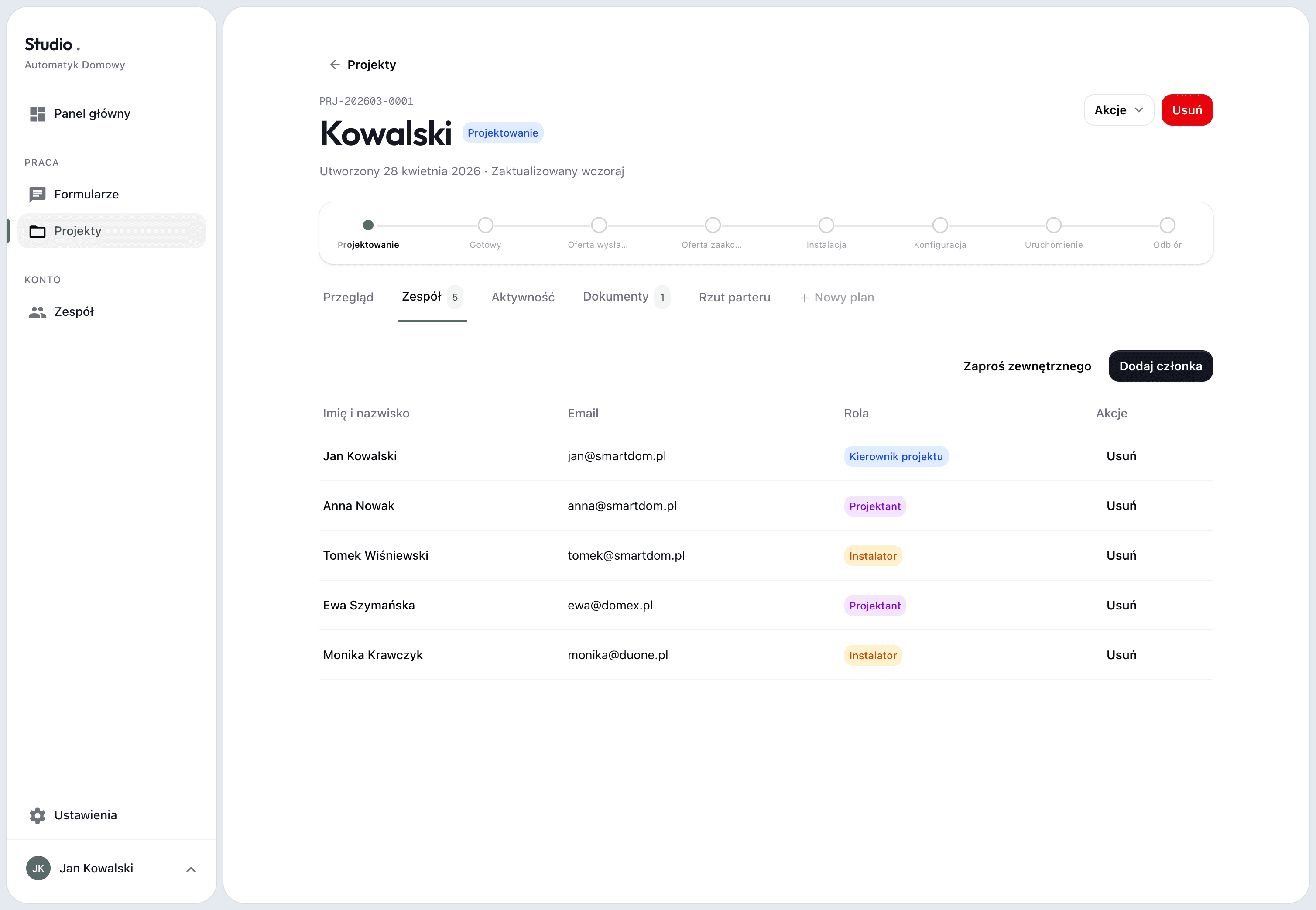
One plan for the whole team
Installer, electrician and the installation company see the same floor plan with the same elements. You change something — they all see the current version instantly.
Live function and scene list
Every automation described: when it fires, what it does, which devices it touches. Nobody works off a stale PDF.
A shared bill of materials
The installer picks hardware, the electrician sees the loads to plan for, you see the scope for the client — all from the same list.
Roles and permissions
You decide who can edit the project and who only has view access. External collaborators — installer, electrician, manufacturer — only see this one project, not the rest of yours.
The architect keeps the aesthetics, the installer adds the technical layer. Everyone works on the same floor plan.
What your studio gets
Not another tool to learn. A basis for pricing and control over the project.
No CAD required
You work in a browser, dragging elements onto the plan. The same way you arrange furniture in a moodboard — just with smart home elements.
Shared workspace
Installer adjusts a cable route? You see it instantly. Electrician pins a note on a circuit? It's in the project. No 14 file versions, no email ping-pong.
A hard scope for the client
The client sees what smart home contains — every element, every scene. The scope is laid out, the quote stays concrete.
Client comes back a year later, you reopen the project
Client comes back after a year with a new idea? Open the project, add a new version. The history of changes and scope is always at hand.
Most asked by interior architects
Do I need to know KNX, Loxone or Grenton?
No. You design functions: presence sensor in the hallway, keypad by the door, „leaving home" scene. Picking the specific system and hardware is the installer's stage — you create the brief they work from.
Do I need CAD?
No. You upload the plan as JPG or PNG (e.g. from your interior project) and work on it directly. You drag elements with the mouse — like arranging furniture in a moodboard.
How do I quote smart home if I don't know the prices?
You don't have to. You design the functions — „10 switched lighting points, 3 presence sensors, 4 scenes". The installer picks the hardware and quotes based on your project. The client sees scope, not guesses.
Does the client need an account to see the project?
No. You send a link — the client opens it in a browser, walks the plan, leaves comments. You can password-protect it or leave it open.
How does the delivery team get the project from me?
You invite the installer, the electrician, the installation company — even a lighting manufacturer — into this one project by email. Each person gets their own account with access only here, not to the rest of your projects. They work in the same tool as you, with every change visible live. The manufacturer sees the client's needs in the context of the whole investment, not an isolated inquiry. No more „send me the latest file" — everyone is in one place.
What if the client wants to change something after the install?
You have full project history, every version, every automation. Open the project, make the change, version it. The installer sees exactly what's new.
I'll show you the app on your own project
Write a few sentences about the projects you run. We'll set up a call and walk through the app on a real floor plan, not slides.