Invite the whole team to one project. Including the client.
In a typical smart home project, everyone works on their own. The architect draws the floor plan, the installer receives it by email, the manufacturer learns about the inquiry from a distributor, and the client only sees the result after installation. Here it's different. There's one project — you open it, invite the installer and electrician, send the link to the client. The manufacturer adds products from their catalog. Every version is saved in history.
A
Architect
Leave room for the control panel.
I
Installer
Cable will run under the floor.
M
Manufacturer
These fixtures from our catalog will fit.
C
Client
Scene is ok, but the button needs to be lower.
Architect
Places elements on the floor plan, controls aesthetics, accepts client comments.
Installer
Sees the same floor plan, adds cable routes, picks hardware from manufacturer catalogs.
Manufacturer
Sees the full project context — not a one-off inquiry — and proposes their products.
Client
Opens the link without an account, walks through the rooms, pins comments in specific spots.
You only pay for your own seats. Client, external installer, manufacturer — none of them count toward your bill.
Everyday reality
Problems we solve
01
A messy briefing
The client messages you on chat — wants a bedroom blind to lower at dusk, a “leaving home” scene on a wall switch. Sends the architect's floorplan by email, follows up with construction photos. After a week you can't remember what you promised whom, and finding it takes half an hour.
The form collects the full picture right away. Studio shows every inquiry and project with its history — one source of truth.
02
"Send me the current file"
An architect sends a PDF floor plan with three versions in a row. The installer asks for the current file. The client has a copy from last week. After two days and 14 emails, nobody knows which version is "the right one".
One project. All participants see the current state. Version history is one click away — you go back to any point and see what changed.
03
The client doesn't know what they're buying
You explain off the cuff: “a switch by the door, a presence sensor in the corridor, a leaving-home scene”. The client nods, signs the contract, and after the install says “this isn't what I had in mind”. An electrical schematic shows wires, not functions.
The client opens a link on their phone, clicks through the rooms and sees what each element does. They approve what they see, not what they understand from a description.
04
Five tools, none aware of the others
The device list in Excel doesn't know about the offer in Word. The floor plan in CAD doesn't know about pricing. Scenes described in emails don't know about anything. Change one thing in the project — you edit three files manually.
The design, the device list and the documentation are generated from one place. Change something in the Planner — the bill of materials updates itself.
05
"Just one more small change..."
The client calls a month later: the button was supposed to do something else, we never agreed on that, and here's another change on top. Every "small tweak" eats hours, and it's awkward to invoice.
The client reviews the interactive project through a link and approves what's in scope — you have proof of acceptance. Out-of-scope changes are documented: you invoice separately, no disputes when the final payment is due.
06
The system as a black box
You come back to a project a year later — you can't remember how you configured it. The client can't change anything without you. Another company is afraid to touch it.
An execution plan describing every function, scene and automation. Every version is saved in history — jump back to any point and see what changed.
Workflow
How it works
One flow — from the first client conversation to approved project.
01Form
You capture project requirements in a form
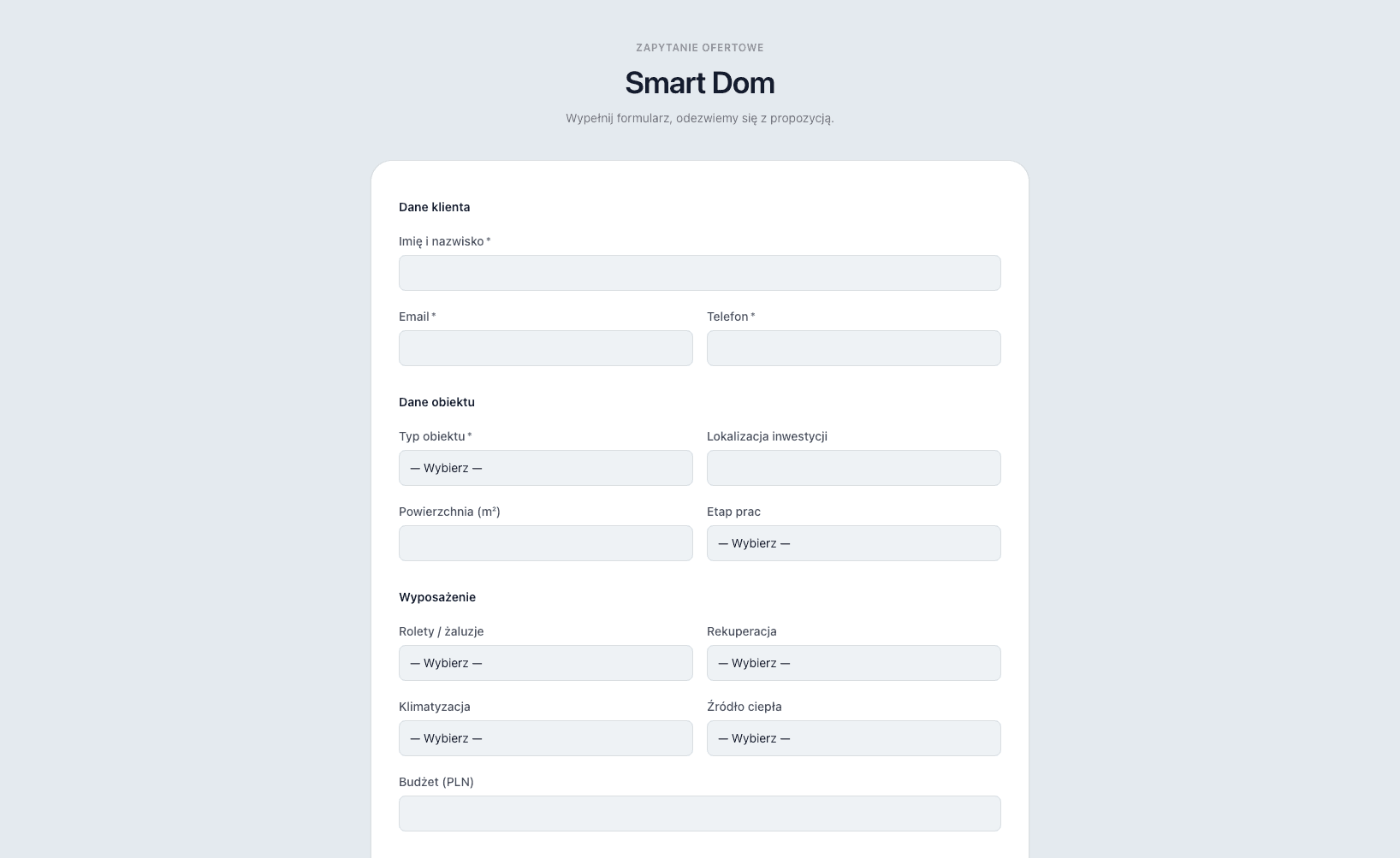
You define your own fields — you ask exactly what you need: contact info, budget, timeline, floor plan, functional requirements. The client fills the form themselves on your website, you fill it together at a meeting, or you capture the requirements yourself — after a site visit, from an architect's brief. Everything lands in one place, with no emailing the floor plan separately and no working out details over chat.
02Studio
The inquiry lands in Studio
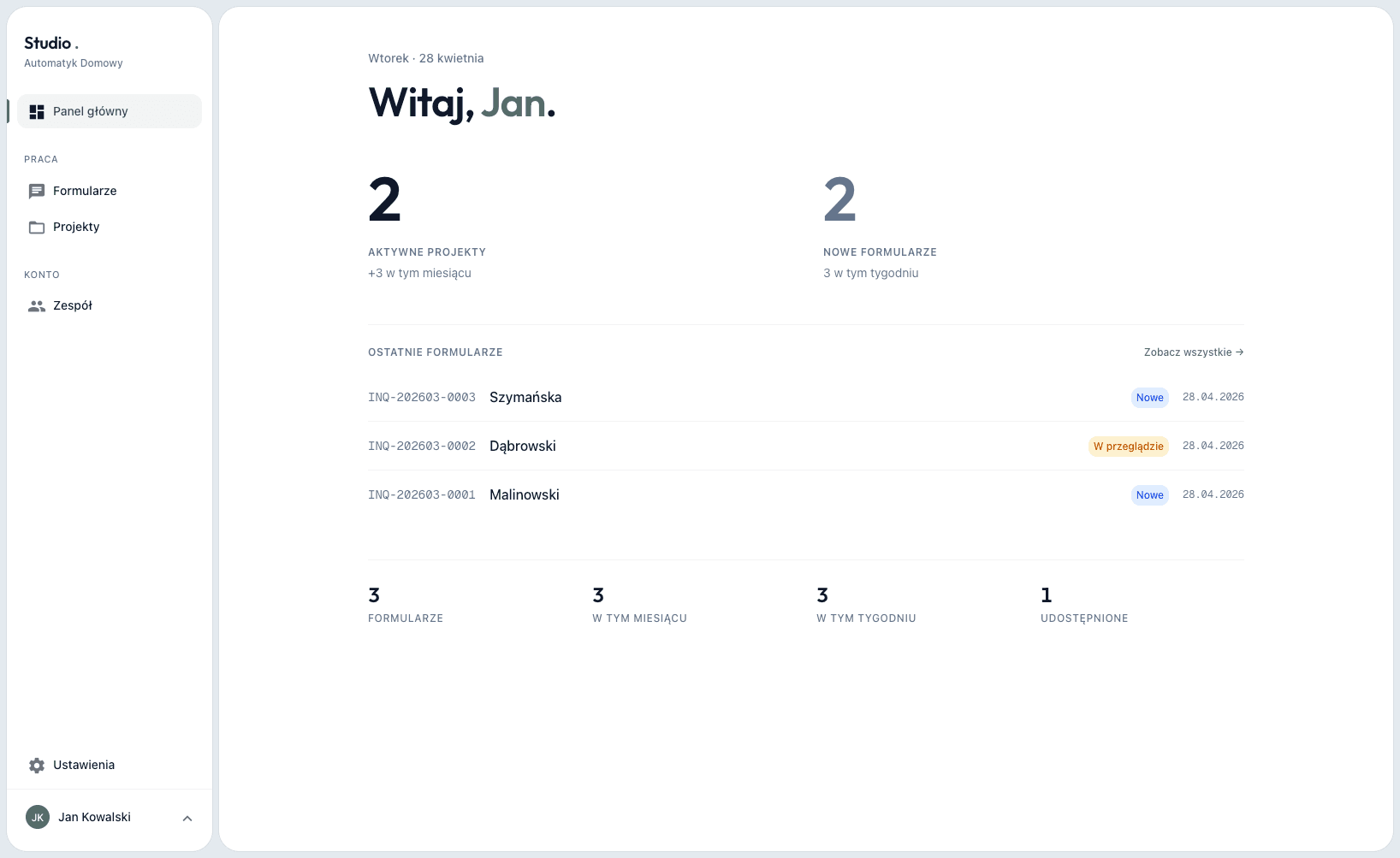
The form data lands in Studio as a new inquiry with the full set of requirements — you see all the information in one view, without copying from emails. You set a status, assign it to a team member, turn it into a project with one click — the floor plan flows straight into Planner, you don't have to re-upload it.
03Planner
You design the installation functions
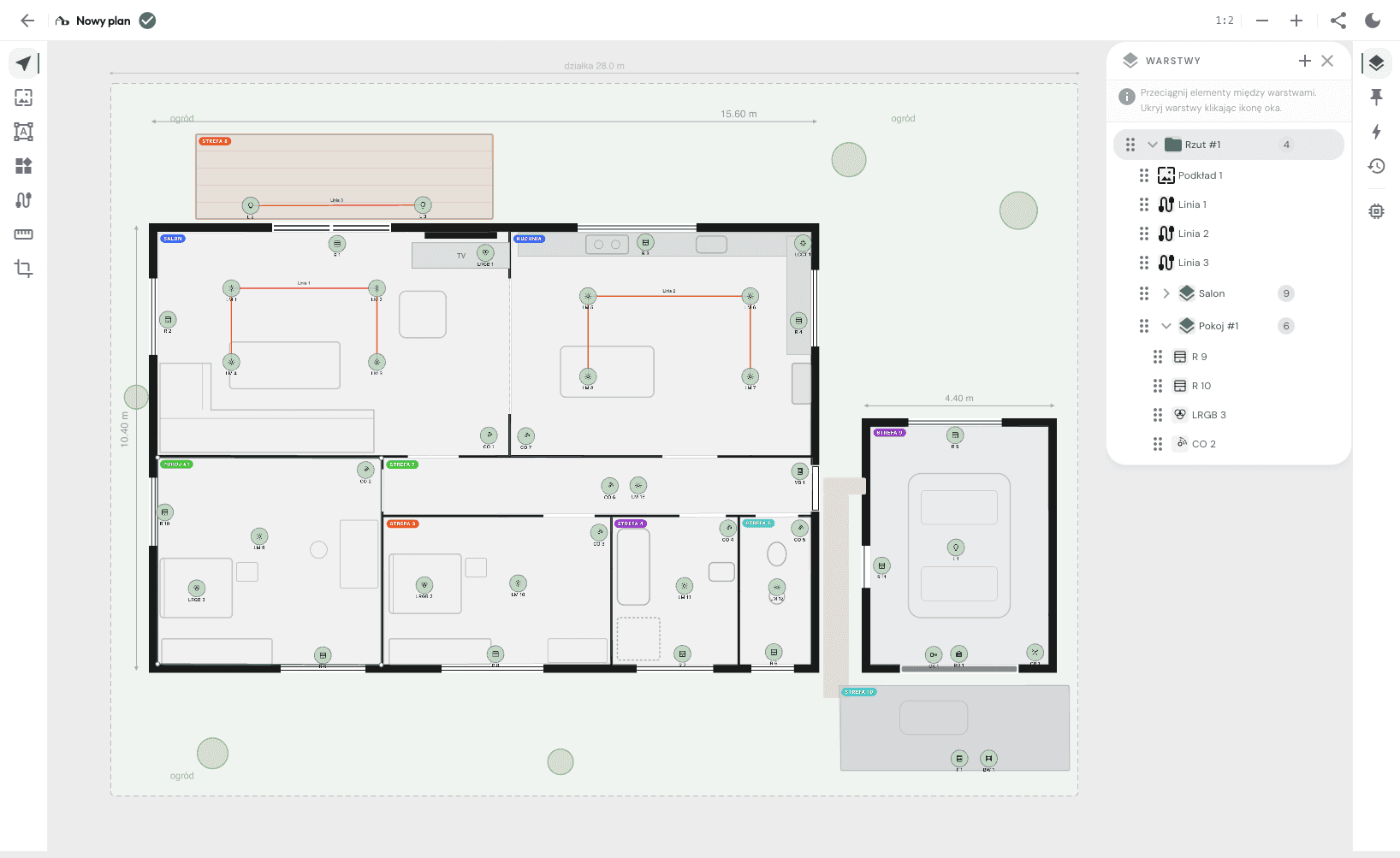
You open Planner directly from the project — the client's floor plan is already loaded. On it you place devices: lighting points, sensors, keypads, blinds. You define scenes, automations and dependencies between elements. At this stage you design functions, not specific hardware — you're not locked to any manufacturer.
04Product catalogue
You pick hardware from the manufacturer catalogue
You assign a specific product from manufacturer catalogues to each element of the design. The system checks compatibility (e.g. whether the LED fitting is DALI-controllable and whether the DALI gateway has enough free addresses for every fitting on the floor), calculates the control modules you need. You know exactly what to order before you send the quote.
05Documents
You assemble the execution plan
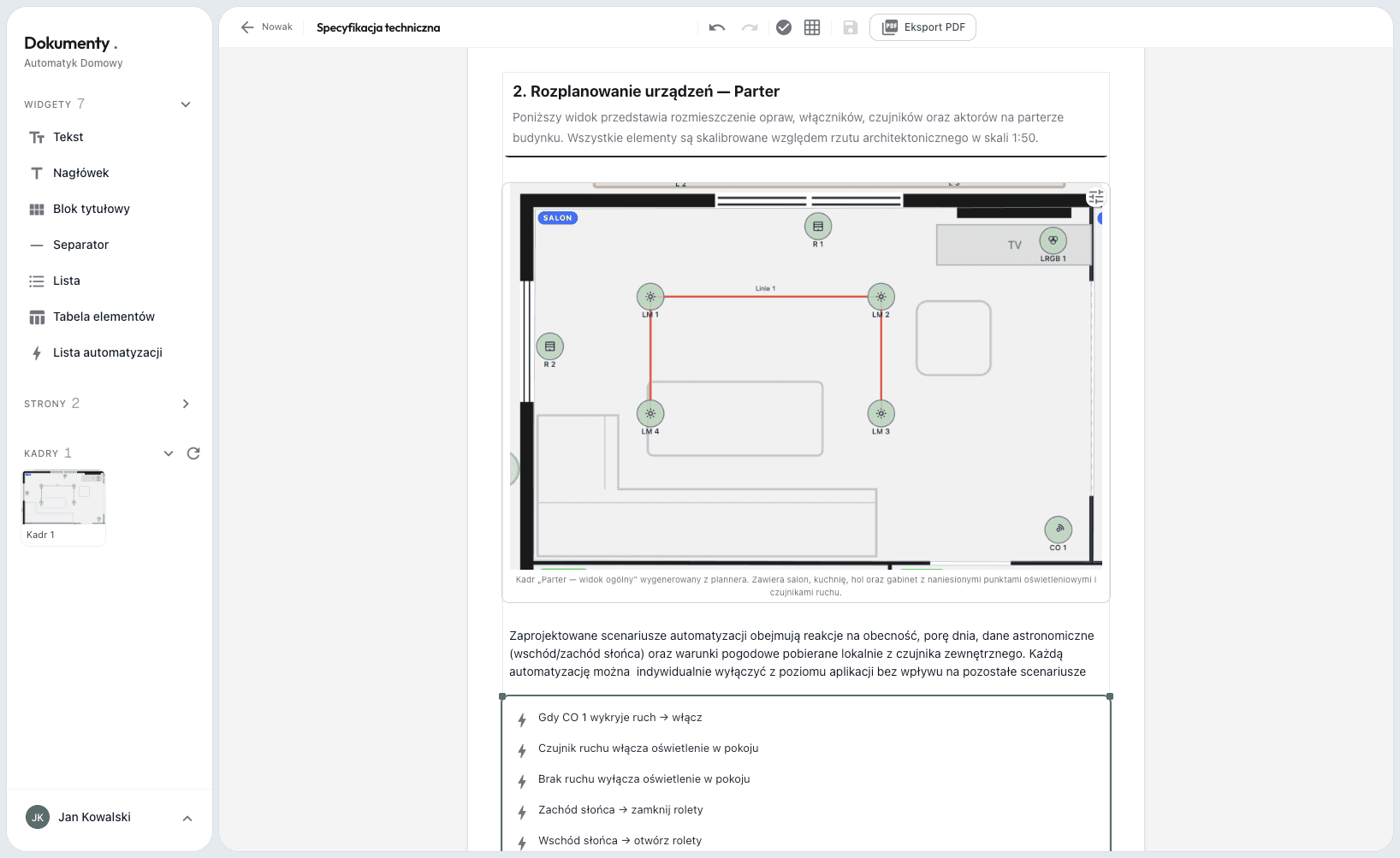
Floor plans, the bill of materials, function and automation descriptions load straight from the Planner — you don't retype anything. You assemble the specification in a drag-and-drop A4 editor and export a PDF with your company logo. Client, installer and you all work on the same document.
06Client
The client reviews and approves
You send a link — the client opens the project in a browser, no account needed. They click through the floor plan, check the rooms, leave comments directly on the plan. You see their comments, mark what's resolved. Once everything's agreed — the client approves, you move to installation.
Version history — you see what changed since last time
Permissions and teams as you scale
03Supplier / Manufacturer
You supply devices — lighting, sensors, keypads, HVAC, smart home
Designers see your products as suggestions on plan elements
Specifications (voltages, inputs) drive controller sizing in the project
You build brand visibility among designers and installers
Each of the 3 roles sees the tool from their own angle. In their own context, with their own permissions.
Areas
What you'll find in AutomatykDomowy.pl
Four areas of work in one tool. Instead of emails, PDFs and spreadsheets.
01Form
Form
You define your own fields tailored to how you work. The client fills the form themselves on your site, you fill it together at a meeting, or you capture the requirements yourself after a site visit. Either way: a complete dataset in one place, ready for the project.
automatykdomowy.pl
02Studio
Studio
Inquiries, projects and people in one place. Team members have their roles; people from outside the company (designer, subcontractor) get access only to a specific project you invite them to. You know what's happening at every stage.
automatykdomowy.pl
03Planner
Planner
You import a floor plan, design installation functions, draw cable runs, define scenes and automations. Every project version is saved in history.
automatykdomowy.pl
04Documents
Documents
You assemble the execution plan from widgets that pull data straight from the design — floor plans, bill of materials and automation descriptions update with the project. Export to PDF with your company logo.
automatykdomowy.pl
The shift
What changes in your work
It's not about tool features. It's about what your workdays, client conversations and old projects look like.
Client calls asking about the execution plan
The client clicks through and sees what they'll get
Complaints a year after handover
An execution plan describing functions, every change documented
Small jobs turned down because they don't add up
Even a small execution plan takes minutes
Hunting for the floor plan for 30 minutes
Every project and floor plan in Studio
Coming back to a project a year later — can't remember the configuration
Every version saved in history, click and see
Roadmap
What's live, what we're building, what's next
An open list. See what we're working on now and where we're heading.
Available16
Working today, in the product.
Installation design on a floor plan
Grouping installation elements into layers
Notes on the floor plan
Cable runs on the floor plan
Planner floor plan snippets inside the document
Project version history
Documents with PDF export
Product catalogue — manufacturers map their products to plan elements
Bill of materials from the product catalogue — with prices and quantities
Automation rules and function list
Form tailored to the way you work
Company branding in the form and PDF
Project management with stages
Per-project teams and permission management
Guests and per-project access
Sharing the project with clients
In progress08
We're actively working on it.
Scheduling meetings through a calendar
AI design assistant
Handling extra jobs and callouts
Site visit reports
Custom document templates
Contract generator for clients and subcontractors
Desktop and mobile app
Real-time collaboration between people
Planned07
Next on the list.
KNX / Loxone / Grenton integrations
Commercial costing — labour, margin, VAT
Lighting configurators
Public API
Manufacturer program — deeper onboarding and collaboration with integrators
Job marketplace
Shared project with other trades — plumbing, HVAC, alarms, monitoring
Questions
Frequently asked questions
How long does the first project take in the tool?
The first functional project typically takes 30–60 minutes, subsequent ones a dozen. No training, no install, no onboarding — upload a JPG floorplan, set the scale, design.
What if the client doesn't have a floorplan — only construction photos or a verbal description?
A photo of a hand-drawn sketch on paper or a Google Maps screenshot is enough. In the Planner you set the scale based on any dimension you know (e.g. the width of a garage). You can also start the project without a floorplan and add it later — the version history keeps everything.
Do I need to know a specific smart home system to use it?
No. You design by function — e.g. a motion sensor in the hallway, a button by the door that turns off the lights, a "leaving home" scene. Hardware is picked afterwards from the product catalogue. You can compare how the same project looks across different systems.
How do I upload the floor plan of a house or apartment?
Upload a photo or a scan of the floor plan in JPG or PNG. Set the scale on the plan (e.g. mark a wall segment and enter its length) and design directly on top of it. The floor plan can be moved, scaled and have its opacity adjusted.
Does the client have to create an account to see the project?
No. You generate a project link — you can protect it with a password or leave it open. The client opens it in a browser on phone or computer, clicks around the floor plan, inspects the rooms and leaves comments directly on the plan. You see their comments and mark what's been handled.
Can I give access to a designer or installer from another company?
Yes. You invite them by email to a specific project and assign a role with the right permissions. They only see that one project, with no access to the rest of your data. You can restrict them further, e.g. view-only.
Does it work on site without internet?
The Planner runs in the browser — you need internet to design. Execution plans you download as PDF and open on phone or tablet offline. A desktop and mobile app with offline mode is in development (see the Roadmap).
What if the tool doesn't suit me?
You cancel anytime from Studio, no support email needed. No credit card to start, no commitments. You export your data to PDF and images — you lose nothing.
Can I export my data?
Yes, always. Projects export to PDF with your company branding. Floor plan and device list export as an image or text file. Version history and Planner snippets are downloadable too. Your data is yours — no tool lock-in.
What about data security?
You decide who on the team can see and edit what — permissions are set per user. Traffic is encrypted, files are served through signed links with limited validity.
Contact
I'll show you the app on your own project
Write a few sentences about the projects you run. We'll set up a call and walk through the app on a real floor plan, not slides.