One tool
instead of five spreadsheets.
From floor plan to documentation.
Floor plan, layers, automations, hardware and documents in one project that all talk to each other. Change something on the plan — the bill of materials and the documentation know right away.
Smart Home
What eats your day as a designer
Not the design itself — everything around the project you have to do to keep it alive.
Five tools, none talks to the next
CAD has the floor plan, a spreadsheet has the devices, Word has the offer, email has the decisions, a PDF goes to the installer. Every change means updating five files by hand — and praying they don't drift apart.
Documentation drifts from the project
Floor plan in one file, device list in another, scene description in a third. After a few changes, none of them shows the current state — and the installer asks which one is „the real one".
Coming back to a project after a year is a mystery
You come back after a year — you don't remember why that switch had three functions. What was agreed with the client, what you fixed after the install — you can't see it from PDFs in a folder.
Small jobs don't add up
You draw it in CAD, then in a spreadsheet, then in Word. For 5 lighting points it just doesn't pay to sit down — so you turn the small ones down.
Your day in a single project
From empty floor plan to finished documentation — without hopping between tools.
Draw the plan with functions and automations
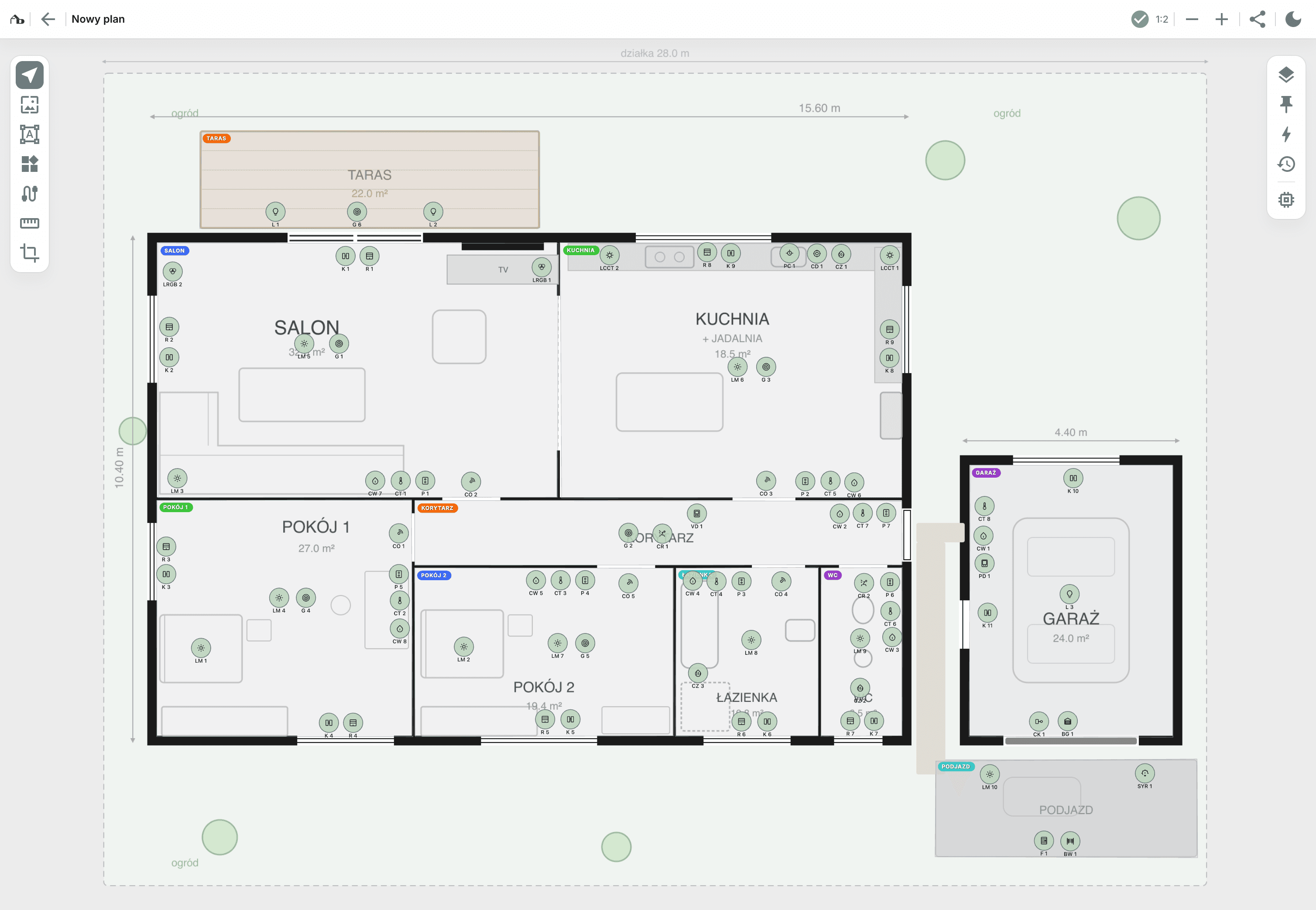
Upload the floor plan, set the scale and drop in elements: lighting points, sensors, keypads, blinds. Group them into layers — lighting, alarm*, HVAC*. Draw cable routes, define scenes and dependencies. All in one project.
Pick devices from the manufacturer catalogs
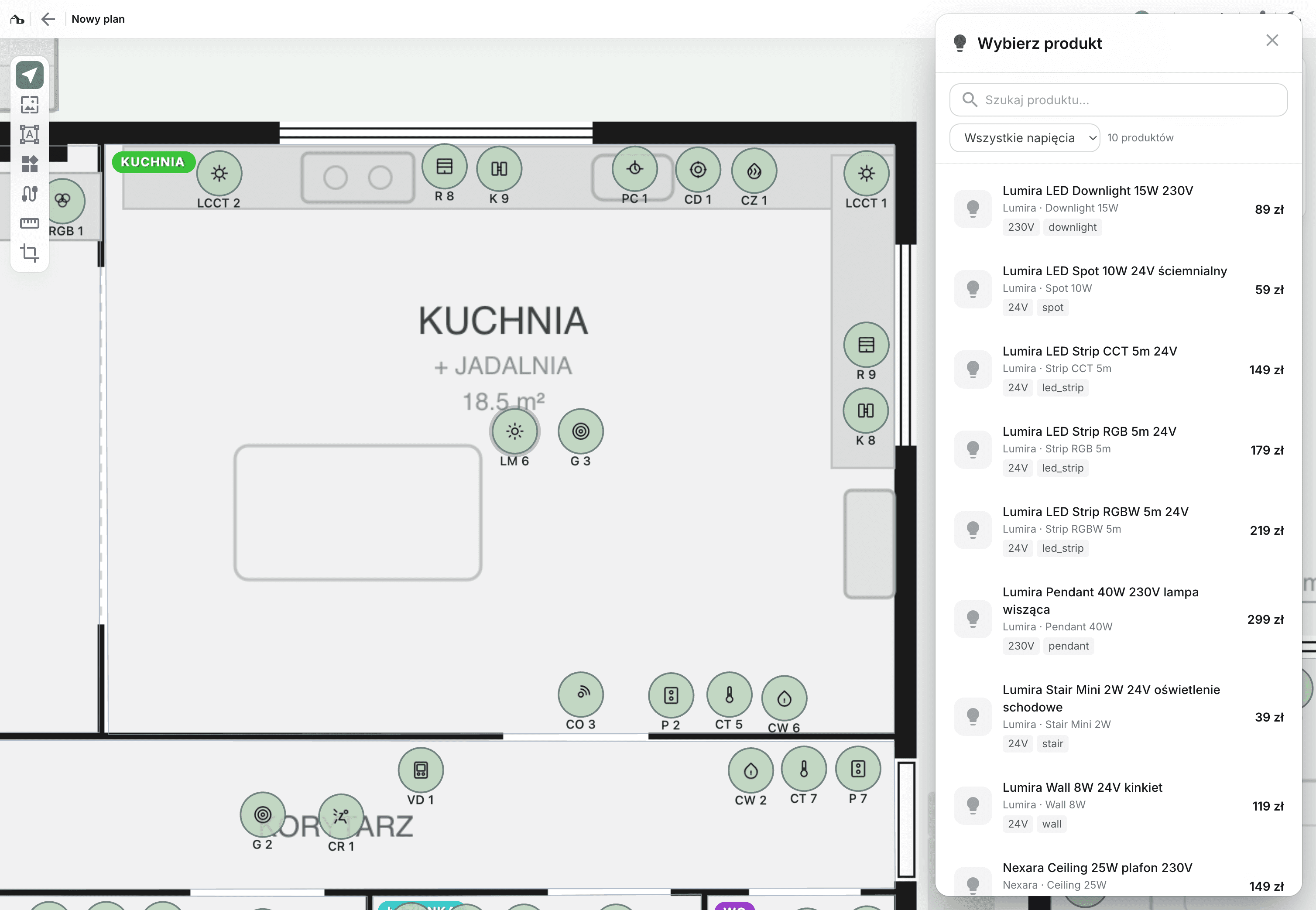
For every element you assign a concrete model from the manufacturers' catalog. The system checks compatibility (voltages, inputs), counts control modules and outputs in the distribution box. The bill of materials builds itself — with unit prices.
Assemble the execution plan
Floor-plan cut-outs, device tables, scene descriptions — drag them as widgets onto A4 pages. The widgets pull data from the project, so when you change the plan the document updates. Export to branded PDF whenever you need it.
Floor plan, BOM, documents — connected
The key difference: the project is not a file. It's a living structure that the bill of materials and the documents pull from.
Floor plan, elements and automations on one project
Lighting, alarm*, HVAC*, blinds — separate layers on the same floor plan. You toggle only what you care about right now. Automations live in the context of the elements on the plan, not in a separate tool.
The bill of materials updates itself
Add a sensor to the plan — the BOM grows. Change the model — the price changes. Remove a point — it disappears from the list. No copying between spreadsheets, no „I need to update Excel".
Documentation is generated from the project
Widgets in the A4 editor pull data from the plan: plan, device list, scene description, cable routes. The project is the source, the document is the view — change one, the other updates.
One source of truth — you don't translate between files, the tool does it for you.
* Full alarm and HVAC automation — part of the target solution (multi-trade project on the roadmap). Today you name layers freely and group the elements currently available in the project.
Hardware from manufacturer catalogs, with compatibility checks
No copying specs from vendor PDFs. No counting distribution-box outputs on paper.
Suggestions for matching models
You drop a „presence sensor". The system shows models that fit your element — together with their technical requirements (voltage, input, control module).
Compatibility verification
Manufacturer says „requires a 12 V input". The system checks whether the automation in your project has that input. You see the mismatch before you order — not a week before the install.
Control-module calculation
How many 0–10 V outputs do you need? How many relays, how many analog inputs? The system works it out from the products you chose — you don't count in your head.
Prices from the manufacturer's catalog
Unit price lands in the bill of materials straight away. You add your margin, you have a ready quote — no guessing, no manual recalculation.
You know what to order and what it costs — before you send the offer.
You all work together — installer, company, manufacturer
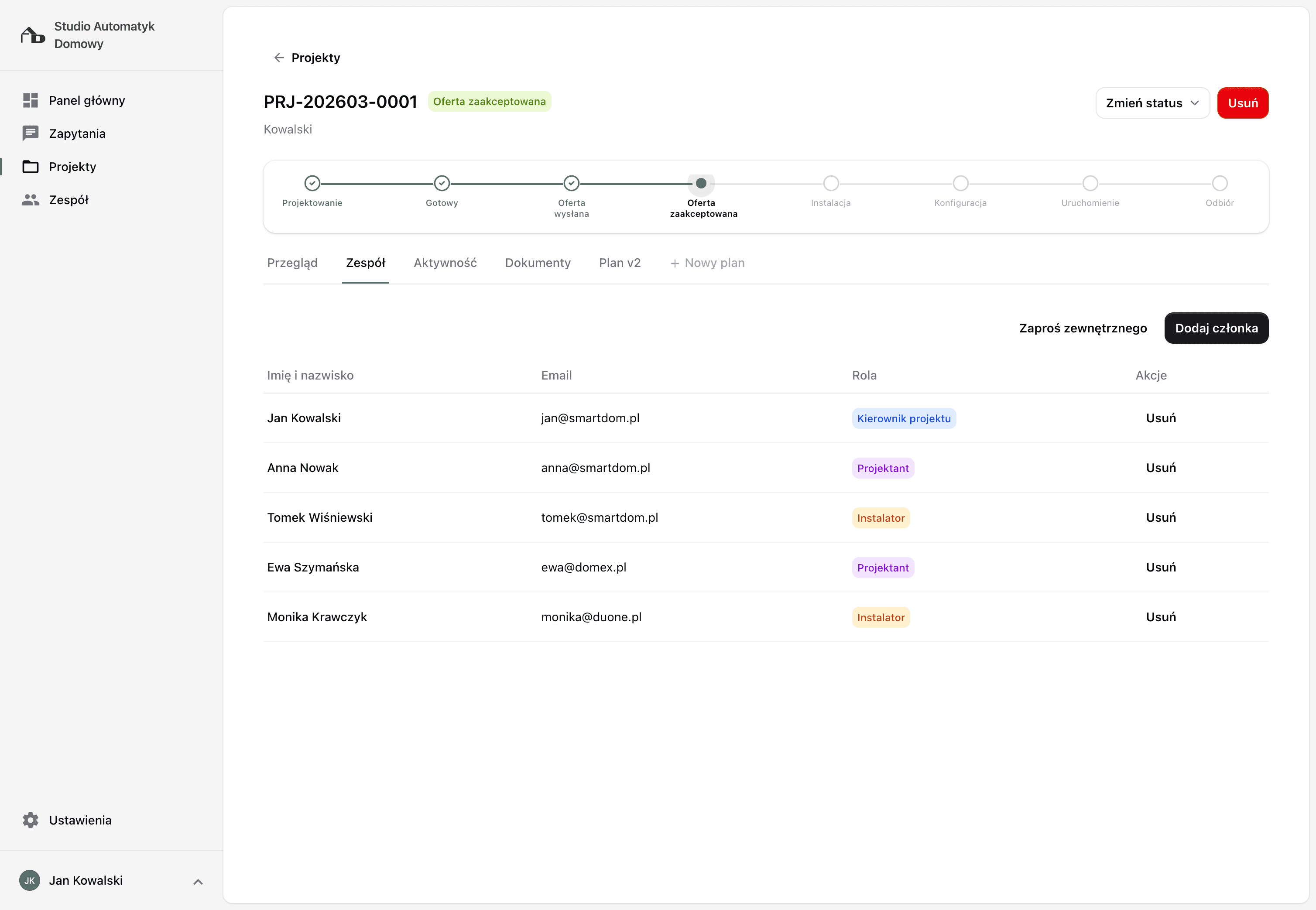
Invite the installer, the electrician, the installation company — even a lighting manufacturer, who now sees the client's needs in the context of the whole investment instead of an isolated inquiry. Each in their own role.
One project for the whole team
Installer, electrician, installation company see the same floor plan with the same elements. You change something — they all see the current version instantly.
Changes visible live
Installer adjusts a cable route? It's in the project. Electrician pins a note on a circuit? You see it in the project. No versioning through email.
Roles and permissions
You decide who can edit the project and who only has view access. External collaborators — installer, electrician, manufacturer — only see this one project, not the rest of yours.
Client comments before install
Send a link — the client opens it in a browser without an account, walks the plan, leaves comments. You mark what's done. Changes before cables go into walls.
This isn't handing over a file — it's a shared project. Each trade in its role, everyone looking at the same thing.
Why this holds up long-term
The tool doesn't just draw — it keeps your project history, orders your pipeline and eliminates re-typing.
Version history
Every project version saved. Client comes back after a year? Open the project as it was and see the diff. Nothing lost.
Cable routes on the plan
Draw routes directly on the floor plan, see segment lengths. Data flows into the documentation — no separate cable spreadsheet.
Floor-plan cut-outs
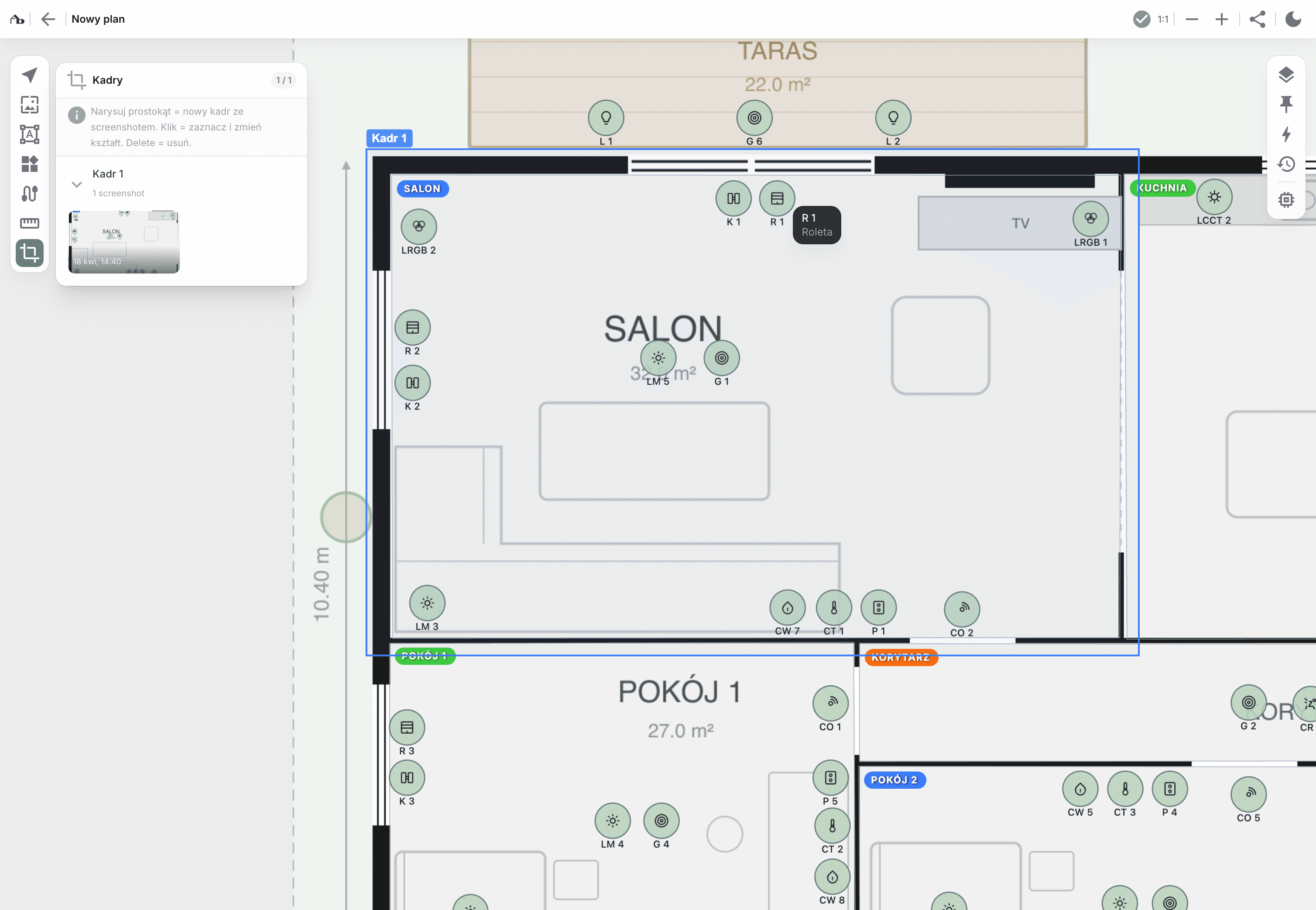
Select an area — living room, kitchen, whole floor — the system takes a snapshot. Paste it onto an execution-plan page together with the device table.
Project pipeline
Ten projects in flight? You see each one: which stage, who owns it, what's waiting for you. Jobs don't get lost between emails.
Branding in the document
The PDF comes out with your company's logo, not a smart-home vendor's. The documentation looks consistent for every client.
No CAD needed
Upload a floor plan as JPG/PNG, work in the browser. A small project takes minutes — it pays off even for 5 lighting points.
Most asked by designers
Do I have to use a specific smart home system?
No. You design functions (presence sensor, lighting point, keypad), and pick hardware from the manufacturer catalog. You can keep the project system-agnostic and then compare it for KNX, Loxone, Grenton or Ampio — without redrawing.
Does the bill of materials include prices?
Yes. Manufacturers add unit prices to their products. As soon as you assign a model to an element on the plan, the price lands in the list. Sum it up, add your margin — the quote is ready.
What does the execution plan look like?
You assemble it in a drag-and-drop editor on A4 pages. Drag widgets: room plan, device table, scene description, cable routes. The widgets pull data from the project, so when you change the Planner the document updates. Export to branded PDF.
Can the client comment on the project?
Yes. You send a link — the client opens it in a browser without an account, walks the plan, leaves comments in exact spots. You see the list and mark what's resolved.
How does the installer or the installation company get the project?
Invite them by email — installer, electrician, the whole company, even a lighting manufacturer. Each gets their own account with access only to this project. You work together; the installer's changes are visible live. If the client prefers a document, export a PDF whenever you need it.
How many project versions can I keep?
No limit. Every version saved, you can go back to any of them. Client comes back after a year asking for a change — open the project, create a new version, the installer sees exactly what changed.
How much does it cost?
During early access PLN 49 net per seat per month. Price is frozen — it stays with you as long as your account is active. Project invitations are unlimited: the client views the project through a link without any account, while a collaborator (installer, electrician, manufacturer) needs their own active account to edit the project.
Design like a professional
Your evenings are yours again. The client sees a complete project, not scattered notes. The team works in one project, each with their own role.
Apply for early access